Shopping Basket
Your shopping basket is currently empty
Quote Request Basket
Your quote request basket is currently empty
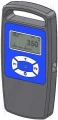
The dynarope™ tension meter is a precision device for measuring forces in a tensioned cable or rope.
The meter can be attached directly to the cable. When the tension meter is placed on a tensioned cable, the load cell will generate a signal which is proportional to the force.
Applications: antenna wires, suspension bridges, electronics, sailing ships, etc.
There is a large variety of cables, each cable having its own characteristics such as composition, diameter, rigidity, density, etc. The database includes several basic wire rope data. We are happy to help you choose the right model and parameter settings in our wire rope database. The HF36 series have a standard USB link for managing and storing measurement results on a PC. Can also be used as stand-alone.
Plastic case, measuring sensor, handheld display + LPT cable, USB cable, batteries and software loader light

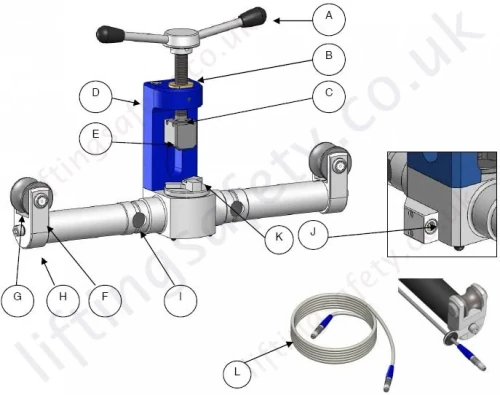
| A | Crank | G | Sheaves |
| B | Bronze Nut | H | Support of the Sheaves |
| C | Tightening Screw | I | Strain Gauges |
| D | Crank Support | J | LEMO Plug |
| E | Jaw | K | Rotary Stop Block |
| F | Axle of the Sheave | L | LEMO Cable |
LEMO connector is a « push-pull » connector.
The LEMO self-latching system allows the connector to be mated or unmated by simply pushing or pulling axially on the outer release sleeve.
Any rotation of the plug while in the socket will damage the connector and hence the connection between the sensor and the display.

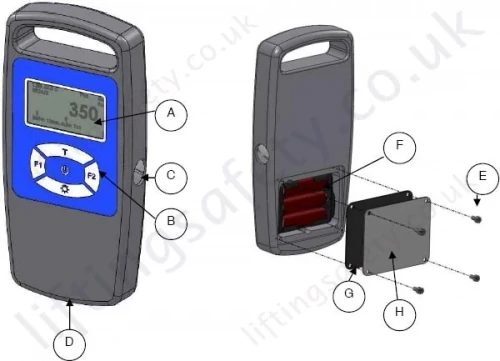
| A | Display | E | Battery Cover Fixing Screws |
| B | Keyboard | F | Batteries (AA1.5V (3)) |
| C | USB Plug (option) | G | Gasket |
| D | LEMO Plug* | H | Battery Cover |
LEMO connector is a « push-pull » connector.
The LEMO self-latching system allows the connector to be mated or unmated by simply pushing or pulling axially on the outer release sleeve.
Any rotation of the plug while in the socket will damage the connector and hence the connection between the sensor and the display.

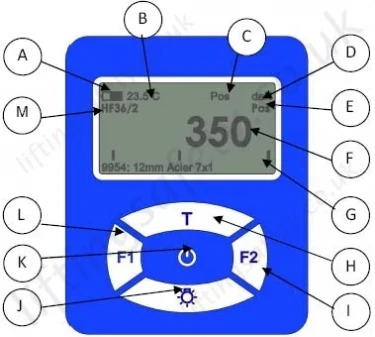
| A | Battery level indication | B | Current temperature |
| C | GPS Status | D | Current unit |
| E | Position of the rotary stop block | F | Current measure |
| G | Graphic visualization of the measure between maximum and minimum | H | · Press 3 sec = increase police of the current measure · Auto-off: keeps the device on In MENU Mode · Press = scroll up |
| I | · Press = access to wire rope data bank · Press 3 sec = access to historical In MENU Mode · Press = Select |
J | · Press 3 sec = Backlight on or off · Press = data log In MENU Mode · Press = scroll down |
| K | · Press = ON · Press 3 sec = OFF When ON · Press = access to MENU In MENU Mode · Press = Enter |
L | · Press = average mode on · Press 3 sec = monitor mode on · Press 3 sec = current mode off In MENU Mode · Press = Escape |
| M | Information about the type of tension meter |
If you wish to receive a quote for this product, please use the tab, this form is for general enquiries regarding this product only.
You can also request a quote through the pricing tab!
You can easily add more than one item to the Quote Request. This is highly recommended as we will be able to suit your needs much more efficiently.
The dynarope™ tension meter is a precision device for measuring forces in a tensioned cable or rope.
The meter can be attached directly to the cable. When the tension meter is placed on a tensioned cable, the load cell will generate a signal which is proportional to the force.
Applications: antenna wires, suspension bridges, electronics, sailing ships, etc.
There is a large variety of cables, each cable having its own characteristics such as composition, diameter, rigidity, density, etc. The database includes several basic wire rope data. We are happy to help you choose the right model and parameter settings in our wire rope database. The HF36 series have a standard USB link for managing and storing measurement results on a PC. Can also be used as stand-alone.
Plastic case, measuring sensor, handheld display + LPT cable, USB cable, batteries and software loader light

| A | Crank | G | Sheaves |
| B | Bronze Nut | H | Support of the Sheaves |
| C | Tightening Screw | I | Strain Gauges |
| D | Crank Support | J | LEMO Plug |
| E | Jaw | K | Rotary Stop Block |
| F | Axle of the Sheave | L | LEMO Cable |
LEMO connector is a « push-pull » connector.
The LEMO self-latching system allows the connector to be mated or unmated by simply pushing or pulling axially on the outer release sleeve.
Any rotation of the plug while in the socket will damage the connector and hence the connection between the sensor and the display.

| A | Display | E | Battery Cover Fixing Screws |
| B | Keyboard | F | Batteries (AA1.5V (3)) |
| C | USB Plug (option) | G | Gasket |
| D | LEMO Plug* | H | Battery Cover |
LEMO connector is a « push-pull » connector.
The LEMO self-latching system allows the connector to be mated or unmated by simply pushing or pulling axially on the outer release sleeve.
Any rotation of the plug while in the socket will damage the connector and hence the connection between the sensor and the display.

| A | Battery level indication | B | Current temperature |
| C | GPS Status | D | Current unit |
| E | Position of the rotary stop block | F | Current measure |
| G | Graphic visualization of the measure between maximum and minimum | H | · Press 3 sec = increase police of the current measure · Auto-off: keeps the device on In MENU Mode · Press = scroll up |
| I | · Press = access to wire rope data bank · Press 3 sec = access to historical In MENU Mode · Press = Select |
J | · Press 3 sec = Backlight on or off · Press = data log In MENU Mode · Press = scroll down |
| K | · Press = ON · Press 3 sec = OFF When ON · Press = access to MENU In MENU Mode · Press = Enter |
L | · Press = average mode on · Press 3 sec = monitor mode on · Press 3 sec = current mode off In MENU Mode · Press = Escape |
| M | Information about the type of tension meter |
If you wish to receive a quote for this product, please use the tab, this form is for general enquiries regarding this product only.
You can also request a quote through the pricing tab!
You can easily add more than one item to the Quote Request. This is highly recommended as we will be able to suit your needs much more efficiently.
LiftingSafety uses cookies to improve your user experience.
Find out more